Willison's Seam Cutter redacts screenshots in-browser, ships its LLM build log
Simon Willison ships a free in-browser screenshot redactor the paid stitchers skipped, with the full LLM build transcript attached.
Willison’s Seam Cutter redacts screenshots in-browser, ships its LLM build log
TL;DR
- Simon Willison shipped Seam Cutter, slicing a strip from a screenshot’s middle and rejoining the halves.
- ShareX, Snagit, and PicPick have shipped the same cut-out mechanic for years.
- Seam Cutter’s actual gap is being free, browser-based, and zero-upload.
- Tailor, the iOS stitcher users pair it with, ships no redaction of its own.
- Every Willison utility now ships with its full LLM build transcript attached.
Today’s tech beat is a single feature, and the frame is in its last TL;DR line. Simon Willison shipped Seam Cutter, a browser tool that slices a horizontal strip out of a screenshot and rejoins the halves — useful for redacting a middle row of a table or chat log before posting. The mechanic itself is old: ShareX, Snagit, and PicPick have offered cut-out tools for years. What Seam Cutter adds is the delivery envelope — free, in-browser, zero-upload — plus a gap in Tailor, the iOS screenshot stitcher most users pair it with, which ships no redaction of its own.
The editorial signal, though, isn’t the tool. It’s that every utility in Willison’s collection now ships with its full LLM build transcript attached. The one-maintainer workflow of prompt → artifact → published log is becoming its own distribution channel — and the thing paid vendors still don’t match.
Willison’s Seam Cutter redacts the middle of a screenshot
Source: simon-willison · published 2026-10-25
TL;DR
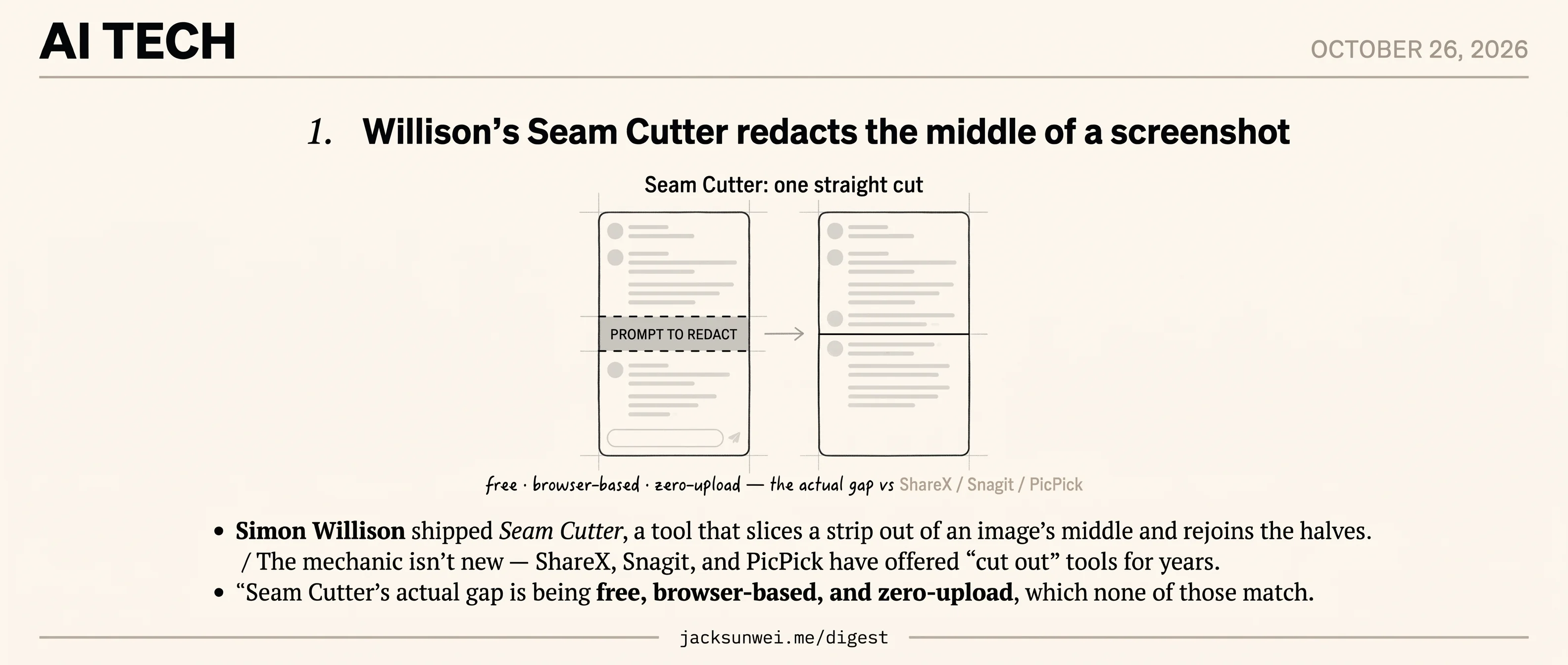
- Simon Willison shipped Seam Cutter, a tool that slices a strip out of an image’s middle and rejoins the halves.
- The mechanic isn’t new — ShareX, Snagit, and PicPick have offered “cut out” tools for years.
- Seam Cutter’s actual gap is being free, browser-based, and zero-upload, which none of those match.
- Tailor, the iOS screenshot stitcher most users pair this with, ships no redaction of its own.
- Every tool in Willison’s collection ships with its full LLM build transcript — that’s the real signal.
What the tool does
Seam Cutter lets you draw one straight horizontal or vertical cut across an image, then slide the two halves together to collapse an arbitrary middle region. Everything runs client-side in the browser — no upload, no account. Willison’s stated use case is redacting a prompt out of a long AI chat transcript before sharing it.
That’s it. One cut, two halves, slide to taste, export. The post itself is a two-paragraph “beat,” which is appropriate to the ambition.
Prior art and the actual gap
Interior cropping is not a new primitive. ShareX’s image editor has shipped a “Cut Out” tool for horizontal and vertical strips with auto-rejoin for years 1, and Snagit and PicPick offer the same with decorative torn edges to signal the omission. A long-running Reddit thread begging Microsoft to add this to the Windows Snipping Tool 2 confirms the demand is real at the OS level — Microsoft just hasn’t moved.
The actual gap Seam Cutter closes is downstream of Tailor, the iOS app most people use to stitch overlapping screenshots into one long image. CNET’s review flags the pain point plainly: Tailor “does not offer tools to blur, black out, or annotate sensitive information” 3. You stitch in Tailor, then bounce to Apple Markup or Picsew to redact. Seam Cutter is the missing composable step — not a Tailor competitor, a Tailor post-processor.
One naming note: this is not seam carving in the Avidan & Shamir sense. That technique uses an energy function and dynamic programming to carve hundreds of low-energy 8-connected pixel paths for distortion-free resizing 4. Seam Cutter does the opposite — one straight user-chosen cut, no content analysis. Anyone arriving from the computer-vision literature expecting liquid rescale will be disappointed; anyone who just wants to delete three inches of a screenshot will not.
Vibe-coded, with receipts
The more interesting story is where this sits in Willison’s tool collection. Every utility he hosts at tools.simonwillison.net ships with a colophon that links to the full LLM build transcript, the model used, and the token cost incurred 5. Seam Cutter is another data point in that experiment: prompt-as-source, published alongside the artifact.
Willison himself draws the line sharply. Vibe coding is for low-stakes personal tools like this one; shipping a production codebase that way without rigorous review is, in his words, a “terrible idea” 6. The HN response to the broader workflow has been split, with some calling it the gold standard for disposable software and others comparing non-deterministic agents to “scissors that cut differently every time.”
That’s the actual payload. Seam Cutter is a thin wrapper over a known feature. But as another public artifact of a workflow that ships prompt, transcript, cost, and output together, it’s a useful case study in what personal software looks like when the build log is part of the release.
Footnotes
-
ShareX documentation — https://getsharex.com/docs/image-editor.html
↩ShareX’s image editor includes a ‘Cut Out’ tool allowing power users to remove horizontal or vertical strips and automatically join the remaining pieces.
-
r/Windows11 feature request thread — https://www.reddit.com/r/Windows11/comments/1soeaz8/snipping_tool_needs_a_cut_out_tool_remove_the/
↩Snipping tool needs a cut out tool — remove the middle, keep the top and bottom.
-
CNET review of Tailor — https://www.cnet.com/tech/services-and-software/stitch-screenshots-together-on-ios-with-tailor/
↩Tailor focuses purely on the stitching process; it does not offer tools to blur, black out, or annotate sensitive information — users must export to Markup or a third-party editor.
-
Shwestrick blog on seam carving — https://shwestrick.github.io/2020/07/29/seam-carve.html
↩Seam carving uses dynamic programming to find an optimal 8-connected path of low-energy pixels, carving hundreds of tiny zig-zagging seams to resize without distorting salient features.
-
tools.simonwillison.net/colophon — https://tools.simonwillison.net/colophon
↩Each tool is listed alongside its commit history and a direct link to the LLM build transcript, exposing the specific models used and the token costs incurred during generation.
-
Simon Willison — highlighted tools post (Sep 2025) — https://simonwillison.net/2025/Sep/4/highlighted-tools/
↩Willison distinguishes vibe coding for low-stakes ‘toy’ projects from agentic engineering for production-grade systems, warning that vibe-coding a production codebase without rigorous review is a ‘terrible idea.’