Made my first 3D model, no CAD
AI didn't make CAD easier; it made the skill optional. Every week an idea flashes through your mind and you let it go because you don't have the skill to chase it. Catch yourself — that's the AI-native shift.
Made my first 3D model, no CAD
Three hours after deciding I wanted a 3D-printed stand for my router, I was holding it.
I’d never drawn a sketch-constrained 2D profile in my life. I don’t know what a “loft” is. The agent wrote OpenSCAD, I dragged and rotated the model in the viewer, we iterated in plain English until the geometry was right. Then I sliced it, printed it, and put my switch under it.
But the router stand isn’t the point. The point is what it implies about every other moment you’ve had — the moment where an idea flashed through your mind and you let it go because you didn’t have the skill to chase it.
The router-and-switch stand
Friday evening. Empty repo, no plan beyond “I want a stand for my router so the switch fits underneath.”
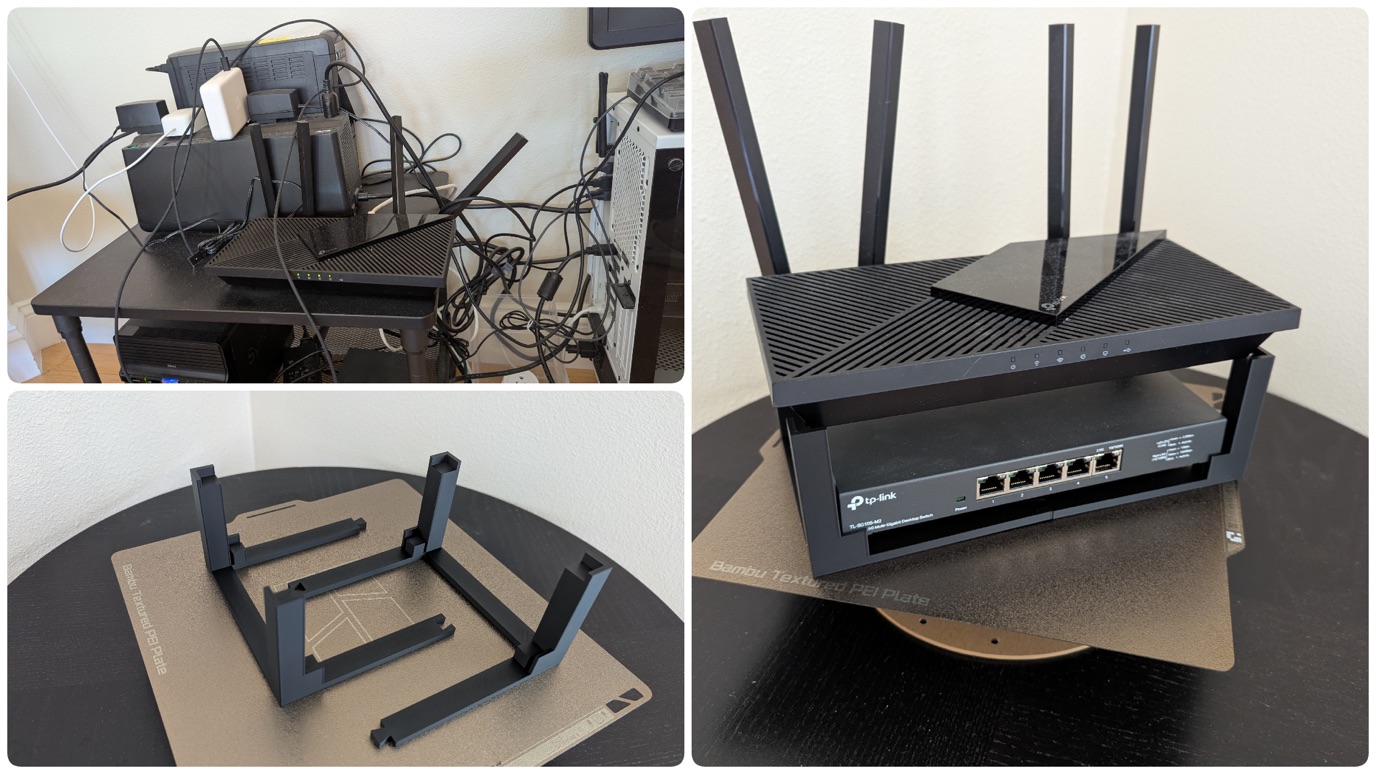
The motivation, fully formed: the cable tangle in the top-left.
I gave the agent a photo and described the goal. A few questions back — router model, switch dimensions, stand style — then a first OpenSCAD draft. I opened it in OpenSCAD’s 3D viewer and dragged the model around. Geometry was right; the idea wasn’t — four loose corner pieces felt fragile. “Connect the feet. Support the switch. Think about airflow.” Two minutes later: connected floor frame, mini L-cups for the switch, an air gap above.
Then it caught what I would not have caught — stand was 270 mm long, my printer’s bed is 256 mm. Split into two halves (bottom-left), gravity-locked under the weight of the router and switch. Exported the STL, sliced in Bambu Studio, printed overnight. Worked first try.1
What I owned: real-world judgment, measurements, deciding what I wanted, holding the printed part and noticing if it wobbled, and the visual loop in the OpenSCAD viewer. What the agent owned: OpenSCAD syntax, boolean geometry, the bed-size catch, and its own PNG self-check. Two loops, composed. Neither of us could have done it alone.
This isn’t really about CAD
The CAD wall came down because parametric CAD is code, and AI agents (Claude Code, Codex, AGY — plus personal agents like OpenClaw and Hermes) write code fluently. The unlock isn’t CAD-specific.
Lots of domains have the same shape: a deep, expert-only tool with a steep learning curve and a high entry bar. The wall is real — but anywhere the underlying operations are programmable (a script, an API, a CLI), the agent routes around the UI entirely. The human still owns what the thing should be; the agent owns how to build it.
3D-printable parts are one corner. The corners are everywhere.
Examples in the wild
You have a backlog, whether you think of it that way or not. Every week an idea flashes through your mind and you let it go — too many YouTube hours, an expert you’d have to pay, a course you’d never finish. Point whichever agent you already use at these. The gap isn’t capability — it’s that you don’t realize you can ask. Here’s what the backlog looks like:
- “I’ve been meaning to learn enough music theory to write a chord progression but the tutorials lose me.” — Agent walks the theory interactively, generates examples in your DAW’s format, you tweak by ear. Skill no longer required: years of theory before writing anything.
- “My dishwasher is making a weird grinding sound and I don’t know if it’s the impeller or the motor.” — Describe the sound, agent walks the diagnostic tree, you check parts in order before calling for a $200 service visit. Skill no longer required: appliance-tech vocabulary.
- “It’s tax season and I have a folder full of receipts and invoices to sort, categorize, and total for deductions.” — Dump the whole folder at the agent; it reads each file, classifies the expense, and hands you back a clean spreadsheet ready for your accountant or TurboTax. Skill no longer required: hours of manual sorting and category lookup.
None of these are big. Each is a single Saturday morning, an idea you’d otherwise have buried. The point isn’t any one of them — it’s how long the backlog gets once you start counting.
Why this isn’t obvious yet
Two reasons, in roughly equal measure.
The viral demos are spectacle, not chore. A poem on demand, a summary of a paper, an image from a sentence — those spread because they’re shareable. They become the screenshots in your timeline; they’re what people show their parents to explain what AI does. The agent-loop tasks — “design a printable part,” “diagnose your dishwasher,” “draft your tenant letter” — are chores. Nobody shares a screenshot of a successful tenant letter. The mental model of “what AI does” ends up shaped by what travels, not by what helps.
Capability has been moving faster than perception of capability. A lot of these were rough six months ago. Now they aren’t. The lag between “this works” and “I know this works” is where most of the abandoned-idea backlog lives.
I see this gap closely because I work in the AI industry — I build agent frameworks, so I watch capability evolve weekly. That’s not credential-flexing; it’s just why I keep noticing the size of the gap between what people can now do with these tools and what they think they can do. My friends are very smart people. They are not surprised by what the agents can do, because they are not asking.
Become AI-native
Being “AI-native” isn’t about adopting a tool. It’s about installing one mental habit: whenever you catch yourself thinking “I’d love to do X, but I’d have to learn Y first” — treat that as a signal. Try the agent on it before you let the idea go.
Most of these tries will be small wins. A printable part. A chord progression. A spreadsheet of receipts. None important on its own. But each one rewires the default — from “give up because of missing skill” to “route around the missing skill.” Stack a year of those and you don’t recognize the version of yourself that used to give up on things.
The bar to clear isn’t a grand thesis on AI. It isn’t a big idea.
It’s the next small idea you were about to let go of.
Footnotes
-
Full source, README, and STL exports at github.com/Jacksunwei/3d-models, MIT-licensed. Fork it, print one, or tweak the parameters for your own hardware. ↩