Rada's script-tag template breaks on CSP, Willison's web-edit ships on Tailscale
Two small developer tools arrive with their deployment perimeters attached: a DOM templating trick and a self-hosted file editor.
Rada’s script-tag template breaks on CSP, Willison’s web-edit ships on Tailscale
TL;DR
- Lean Rada’s
document.currentScripttrick turns a<script>tag into a zero-dependency inline template. - Strict CSP and Trusted Types reject the
replaceWithsink and break the technique on hardened pages. - ES modules, async scripts, and callbacks all return
null, confining the pattern to top-level classic scripts. - Simon Willison’s web-edit 0.1a2 adds clipboard copy and slots into archived FileBrowser’s self-hosted niche.
- Tailscale-only exposure dodges the CVE wave hitting internet-facing editors like TinyFileManager.
Today’s tech beat is two self-contained developer artifacts — a one-line DOM template and an alpha file editor — and the fine print of where each actually runs. Simon Willison’s web-edit 0.1a2 steps into the slot FileBrowser vacated on September 1, but only if you reach it over a Tailscale tailnet with a working secure context; MagicDNS without TLS silently kills the new clipboard feature on mobile. Lean Rada’s $=(...n)=>document.currentScript.replaceWith(...n) is a zero-dependency templating pattern that fails the moment ES modules, async callbacks, or Trusted Types enter the picture. Different stacks, same editorial shape: a tiny tool, a precise perimeter, and the exact runtime conditions that decide whether it works.
web-edit 0.1a2 ships into FileBrowser’s vacated niche
Source: simon-willison · published 2026-10-17
TL;DR
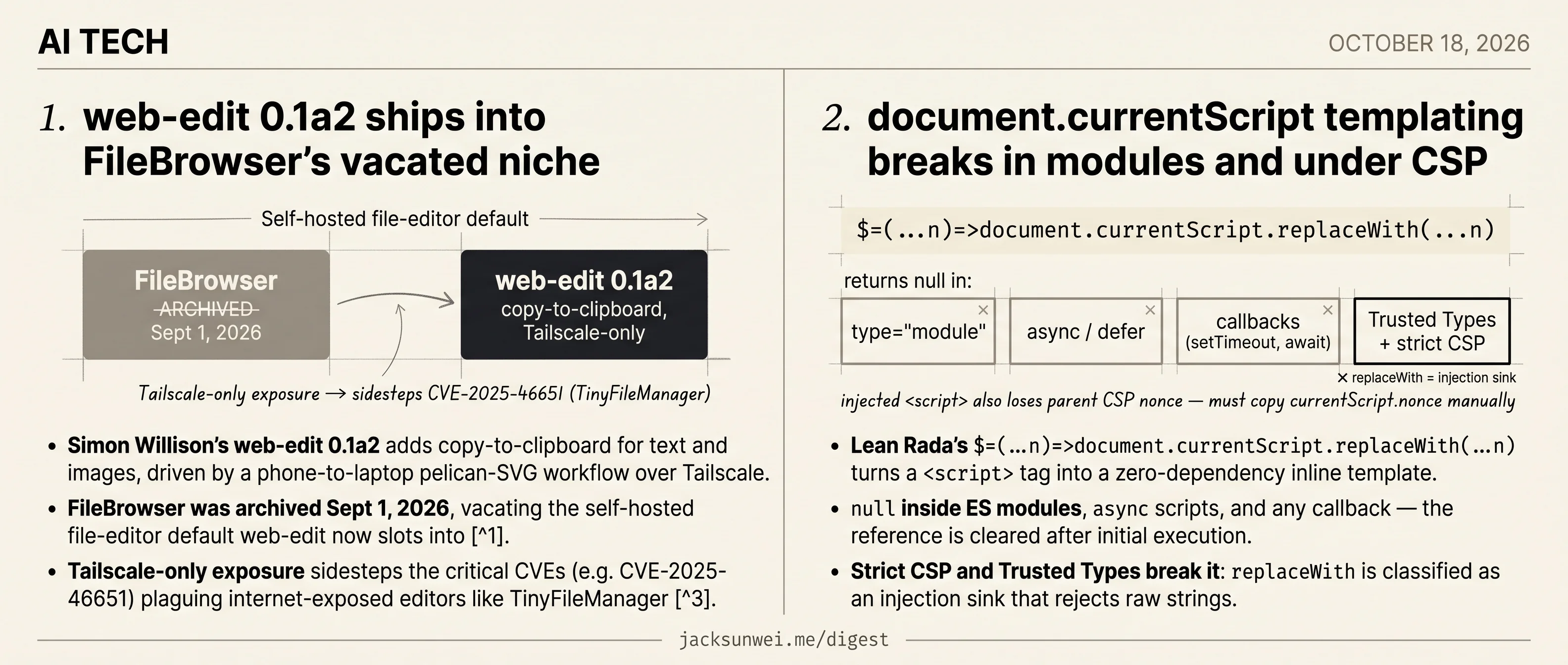
- Simon Willison’s web-edit 0.1a2 adds copy-to-clipboard for text and images, driven by a phone-to-laptop pelican-SVG workflow over Tailscale.
- FileBrowser was archived Sept 1, 2026, vacating the self-hosted file-editor default web-edit now slots into 1.
- Tailscale-only exposure sidesteps the critical CVEs (e.g. CVE-2025-46651) plaguing internet-exposed editors like TinyFileManager 2.
- The clipboard feature depends on a secure context — Tailscale MagicDNS without TLS can silently break it on mobile 3.
What actually shipped
web-edit 0.1a2 is a one-feature release: a “copy to clipboard” button that handles both text and image payloads. Willison built it for a specific loop — running pelican prompts on a laptop, driving from a phone, and pasting the resulting log (including an SVG rendered by DeepSeek 4.1 Flash 1017) straight into a GitHub Gist. That’s it. No new auth, no new storage, no plugin system.
Taken on its own, the ranker’s demote is right: this is a point release of a personal utility. The interesting part is the market it quietly occupies.
The incumbent just died
On September 1, 2026, FileBrowser — the de facto Go-based web file manager running on thousands of homelabs — was officially archived, with no promise of future security patches 1. The replacement landscape is unsettled: FileBrowser Quantum and Sambee are the maintained forks getting pointed to, copyparty wins on resumable uploads over flaky mobile connections 4, and Filestash owns the full-PWA tier.
web-edit isn’t competing with any of those on features. It’s competing on scope — a single-folder editor you can read and audit in an afternoon. In a category where the default just evaporated and the replacements are still being vetted, “small enough to trust” is a real position.
Why Tailscale-only is the actual story
The practitioner consensus on web file editors is blunt: never expose them to the open internet. ssdnodes’ 2026 comparison catalogs multiple critical-rated CVEs against TinyFileManager alone, including SSRF and unauthenticated access bugs, and recommends every tool in the category sit behind a reverse proxy with MFA at minimum 2.
Willison’s deployment model — bind to localhost, reach it over a Tailscale tailnet — collapses that whole threat surface. There’s no public listener to find, no auth layer to misconfigure, no CVE wave to chase. It’s a working template for “LLM-adjacent personal utility that never gets exposed,” which is a pattern more people should copy than currently do.
The clipboard feature has sharp edges
The headline feature rides the Async Clipboard API, which only works in a secure context — HTTPS or localhost 3. Accessed via a plain http:// Tailscale MagicDNS hostname on a phone, the clipboard write will silently fail on several mobile browsers. Anyone cloning this pattern needs TLS termination (Tailscale Serve handles it) or they’ll hit the failure mode without an obvious error.
The relevant platform milestone is ClipboardItem.supports() reaching Baseline in March 2025, which finally lets web apps feature-detect formats like SVG before attempting a write 5. That matters directly here: the pelican workflow produces SVGs, and browsers routinely sanitize or re-encode clipboard payloads — JPGs get rewritten to PNG, some MIME types get stripped entirely 3. A naive navigator.clipboard.write of an SVG blob is not guaranteed to arrive intact on the other side.
Takeaway
The release is small. The pattern it demonstrates — minimal editor, Tailscale-only exposure, LLM-output plumbing — is the thing worth copying, especially this month.
document.currentScript templating breaks in modules and under CSP
Source: simon-willison · published 2026-10-17
TL;DR
- Lean Rada’s
$=(...n)=>document.currentScript.replaceWith(...n)turns a<script>tag into a zero-dependency inline template. nullinside ES modules,asyncscripts, and any callback — the reference is cleared after initial execution.- Strict CSP and Trusted Types break it:
replaceWithis classified as an injection sink that rejects raw strings. - Injected
<script>nodes don’t inherit the parent’s CSP nonce and must propagatedocument.currentScript.noncemanually.
The trick
Simon Willison surfaced a neat one-liner from Lean Rada: define $=(...n)=>document.currentScript.replaceWith(...n) once, and any inline <script>$(expr)</script> becomes a self-replacing template tag. The year is <script>$(new Date().getFullYear())</script> renders as plain text, no framework, no FOUC, no hydration dance.
The underlying API — document.currentScript — has shipped in every major browser since mid-2015. Prism.js and similar libraries have long used it to self-configure from data-* attributes on their own script tag 6. Rada himself labels the Web Component variant of the pattern “a joke,” framing it as a deliberately minimal hack for static-site islands of interactivity, not a component system 6. On Hacker News it resurfaced in the XSLT-removal debate as a FOUC-free alternative to client-side includes 7.
So far, so charming. The problem is what Willison’s post leaves out.
Where the reference disappears
document.currentScript is only populated during the script’s initial synchronous execution. MDN spells it out: the property is not set in callbacks, and is null for modules and async scripts 8. Alex MacArthur adds the rationale — keeping a live reference would pin the <script> element and defeat garbage collection once it’s removed from the DOM 9.
Three concrete consequences for the $() shortcut:
- No
type="module". The moment you addtype="module"to the loader, every$()call returnsnulland throws on.replaceWith. - No
deferorasync. Same story. - No deferred work. You can’t
$(await fetch(...))or call$()inside asetTimeout— by the time the callback fires,currentScripthas been cleared.
For a bundler-driven codebase where every script is a module, that rules out the whole pattern.
CSP and Trusted Types kill it
The second problem is security hardening. The trick is fundamentally an inline-script pattern, and inline scripts collide with the two dominant modern hardening regimes.
Under a strict Content Security Policy, every inline <script> needs either 'unsafe-inline' or a per-script nonce. Worse, if the replacement content itself contains a <script>, the new node does not inherit the parent’s nonce — developers have to manually propagate document.currentScript.nonce to the replacement element or the browser silently refuses to execute it 10.
Trusted Types is harsher still. With require-trusted-types-for 'script' set, replaceWith, innerHTML, and document.write are all classified as injection sinks and reject raw strings outright. A TrustedHTML object is mandatory 11. The entire ergonomic win of $("some string") evaporates.
Trusted Types and strict CSP break it outright. 7
Net assessment
Willison’s post captures the ergonomics perfectly; the research bundle supplies the context that decides whether to ship it. For a personal blog that needs a dynamic year string or a static page sprinkling in a few live values, the trick is fine — arguably ideal. For anything touching ES modules, a bundler, or a hardened CSP, it’s a dead end dressed up as a template language. Know which codebase you’re in before you reach for $.
Footnotes
-
dedimax.com — ‘File Browser is dead’ — https://www.dedimax.com/en/blog/file-browser-is-dead-what-self-hosters-should-use-instead
↩ ↩2FileBrowser was officially archived on September 1, 2026, leaving thousands of deployments without future security patches; maintained forks like FileBrowser Quantum and newcomers like Sambee are now the recommended drop-ins.
-
ssdnodes.com — self-hosted file managers compared — https://www.ssdnodes.com/learn/self-hosted-file-managers-compared
↩ ↩2TinyFileManager faced several ‘critical’ CVSS-rated vulnerabilities in 2025 and 2026 (such as CVE-2025-46651)… security auditors strongly recommend that these editors never be exposed directly to the internet.
-
tomayac.com — Multi-MIME Async Clipboard — https://blog.tomayac.com/2020/03/20/multi-mime-type-copying-with-the-async-clipboard-api/
↩ ↩2 ↩3The Async Clipboard API operates asynchronously and requires a secure context (HTTPS or localhost)… browsers often sanitize clipboard data, and many automatically convert JPG uploads to PNG, significantly increasing file size.
-
daily.dev — self-hosted FileBrowser replacement thread — https://daily.dev/posts/file-browser-is-being-archived-and-my-self-hosted-replacement-is-faster-than-it-in-every-way-tnebddhcd
↩copyparty is frequently cited as the highest-performing option for high-latency connections and large file transfers, often outperforming older Go-based tools in resumable upload logic.
-
web.dev — Baseline ClipboardItem.supports() — https://web.dev/blog/baseline-clipboard-item-supports
↩As of March 2025, the ClipboardItem.supports() method reached ‘Baseline’ status, allowing applications to programmatically verify if a specific format (like SVG) is supported before attempting a copy.
-
Lean Rada — original note — https://leanrada.com/notes/inline-rendering-currentscript/
↩ ↩2I label the Web Component version of this a ‘joke’ — it’s a quick-and-dirty rendering pattern, not a replacement for proper component systems.
-
Hacker News discussion (item 50134617) — https://news.ycombinator.com/item?id=50134617
↩ ↩2Commenters noted the pattern resurfaced in the XSLT-removal thread as a FOUC-free client-side templating option, while others warned Trusted Types and strict CSP break it outright.
-
MDN — Document.currentScript — https://developer.mozilla.org/en-US/docs/Web/API/Document/currentScript
↩This property is only set while the script is initially being processed… it is not set in callbacks and it is null for modules and async scripts.
-
Alex MacArthur — ‘A fun little use for document.currentScript’ — https://macarthur.me/posts/current-script/
↩Once the script’s initial execution is complete, the reference is cleared out — likely so the element can be garbage-collected if it’s ever removed from the DOM.
-
Invicti — CSP implementation pitfalls — https://www.invicti.com/blog/web-security/negative-impact-incorrect-csp-implementations
↩A newly injected inline script does not inherit the nonce of the script that created it; developers must manually propagate document.currentScript.nonce to the replacement element.
-
django-csp docs — Trusted Types — https://django-csp.readthedocs.io/en/latest/trusted_types.html
↩DOM-modifying sinks like replaceWith, innerHTML and document.write require a TrustedHTML object when ‘require-trusted-types-for script’ is set; raw strings are rejected as injection sinks.