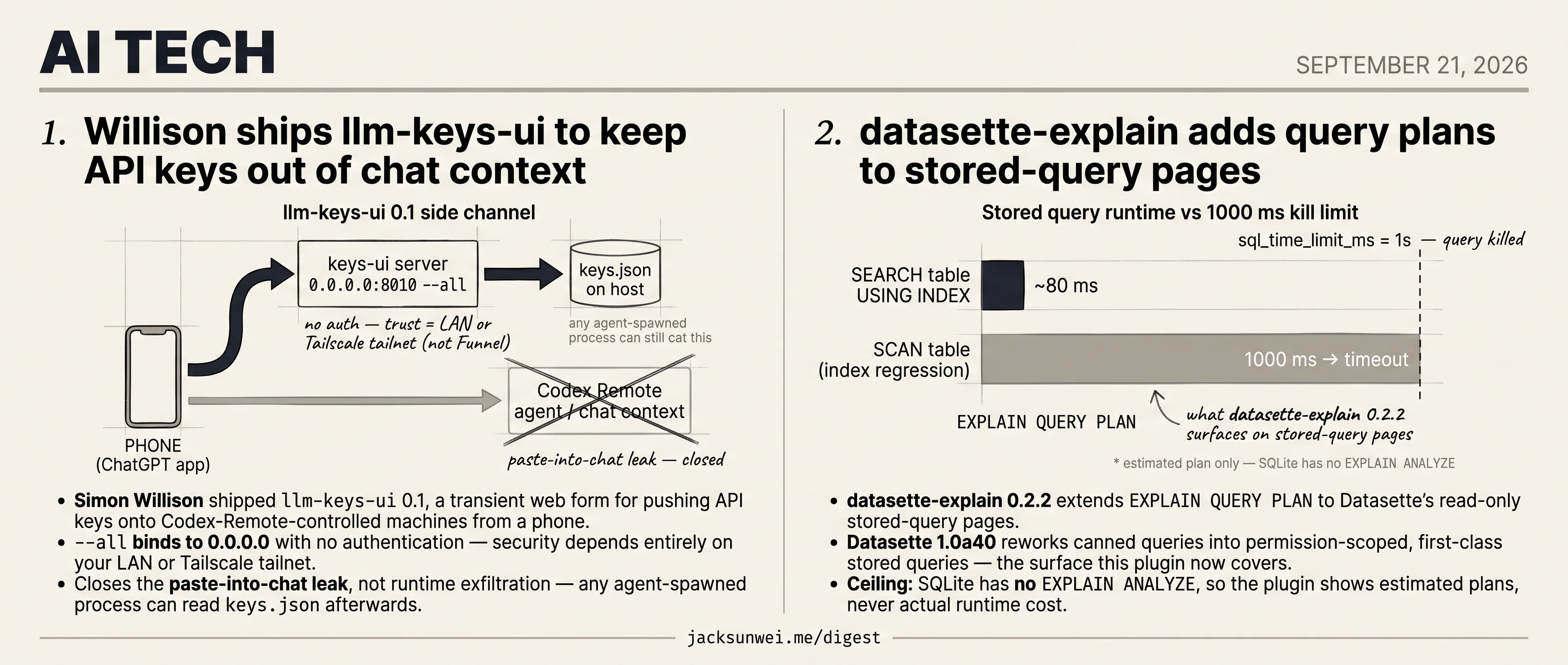
llm-keys-ui closes paste leak, datasette-explain hits SQLite ceiling
Two Willison ships plug a visible gap each, and each stops at a ceiling the underlying tool itself imposes.
llm-keys-ui closes paste leak, datasette-explain hits SQLite ceiling
TL;DR
- Willison’s llm-keys-ui 0.1 pushes API keys onto Codex-Remote machines from a phone via a transient form.
--allbinds 0.0.0.0 with no auth, so security depends entirely on LAN or Tailscale scoping.- Runtime exfil stays open: any agent-spawned process can still read
keys.jsonafter the paste. - datasette-explain 0.2.2 adds
EXPLAIN QUERY PLANto Datasette 1.0a40’s permission-scoped stored queries. - SQLite lacks
EXPLAIN ANALYZE, so the plugin shows estimated plans, never actual runtime cost.
Two Willison ships today, and both share the same shape: each closes a real, visible failure mode, and each stops exactly where the underlying tool’s ceiling begins. llm-keys-ui pulls API keys out of the chat context that Codex-Remote sessions run in — a genuine leak vector — but the keys still land in a keys.json any agent-spawned process can read. datasette-explain surfaces EXPLAIN QUERY PLAN output on stored-query pages, which is the frontline diagnostic for silent index regressions on a server that kills queries past 1s — but SQLite has no EXPLAIN ANALYZE, so the plan is always estimated, never measured. Both plugins are honest about what they don’t do; the reader who ships either one should be equally honest about the second half of the problem.
Willison ships llm-keys-ui to keep API keys out of chat context
Source: simon-willison · published 2026-09-20
TL;DR
- Simon Willison shipped
llm-keys-ui0.1, a transient web form for pushing API keys onto Codex-Remote-controlled machines from a phone. --allbinds to 0.0.0.0 with no authentication — security depends entirely on your LAN or Tailscale tailnet.- Closes the paste-into-chat leak, not runtime exfiltration — any agent-spawned process can read
keys.jsonafterwards. - Complements yottayoshida’s
lkr, which guards keys at rest via macOS Keychain and a (bypassable) TTY check.
The workflow this is built for
The plugin is a narrow fix for a specific new shape of developer setup. Codex Remote pairs the mobile ChatGPT app with a developer’s actual laptop or home server, giving the agent “environment truth” — local databases, VPNs, project toolchains — that a cloud sandbox can’t reproduce 1. Once you accept that model, provisioning secrets becomes awkward: the human is on a phone, the executor is somewhere else, and the obvious channel (paste the key into chat) is exactly the one that dumps it into model context, transcripts, and possibly training data 2.
llm-keys-ui inserts a side channel. Run uvx --with llm-keys-ui llm keys-ui --all on the remote box, hit the printed URL from your phone, type the key into a web form, and it lands directly in llm’s keys.json — never touching the agent’s conversation 3. The agent then retrieves it later via llm keys get anthropic as part of a normal shell command.
flowchart LR
    P[Phone: ChatGPT app] -->|instructs| A[Codex Remote agent]
    A -->|spawns| S[llm keys-ui server on :8010]
    P -->|browses over LAN/Tailscale| S
    S -->|writes| K[(keys.json on host)]
    A -->|llm keys get X| K
The key never traverses the chat channel. That is the entire pitch.
The security ceiling is the network
The --all flag is not cosmetic. It flips the bind from 127.0.0.1 to 0.0.0.0, exposing an unauthenticated form on every interface 3. Willison is explicit that this is intended for short-lived sessions, and within a Tailscale tailnet or a trusted LAN that’s a reasonable tradeoff — identity lives in the network layer.
The failure mode to flag: anyone reaching for Tailscale Funnel to punch through NAT loses that gate. Funnel deliberately ships without authentication for public visitors, and security reviewers explicitly warn against pointing it at AI-agent or credential-handling services 4. If you can’t reach your box from your phone on Tailscale Serve, the answer is not Funnel.
What it doesn’t fix
llm-keys-ui is a delivery-time mitigation, not a runtime one. Once a key sits in ~/.config/io.datasette.llm/keys.json, any process the agent spawns can cat it — and independent guidance on agentic security treats “prompt injection for credential extraction” as a first-class risk, arguing authorization must live in deterministic systems outside the LLM entirely 2. Static-analysis tooling like Codex Security catches some of this at repo scan time but explicitly can’t cover runtime exfiltration paths 5.
A parallel project, yottayoshida’s llm-key-ring (lkr), attacks the other end of the problem: it stores keys in the macOS Keychain and adds a “TTY guard” that refuses to release secrets to non-interactive callers — i.e. agents piping commands. The author concedes the guard is bypassable when the agent runs under a PTY, as Cursor and Claude Code do, so lkr layers Keychain ACLs behind it 6.
The two tools solve different halves. llm-keys-ui hardens the delivery hop from phone to remote host; lkr hardens the resting state on disk. Neither addresses an agent that decides, mid-task, to send your Anthropic key to an attacker-controlled URL. That fix has to live somewhere else — probably in the sandbox around the agent, not in the key store.
datasette-explain adds query plans to stored-query pages
Source: simon-willison · published 2026-09-20
TL;DR
- datasette-explain 0.2.2 extends
EXPLAIN QUERY PLANto Datasette’s read-only stored-query pages. - Datasette 1.0a40 reworks canned queries into permission-scoped, first-class stored queries — the surface this plugin now covers.
- Ceiling: SQLite has no
EXPLAIN ANALYZE, so the plugin shows estimated plans, never actual runtime cost. - Datasette kills queries past 1s by default, making EXPLAIN the frontline diagnostic for silent index regressions.
Why a one-line changelog is worth reading
The 0.2.2 changelog is a single bullet: “Explain plans now work on read-only stored-query pages.” Read in isolation, it’s a nothingburger. Read against the Datasette 1.0a40 release it ships beside, it’s the plugin-side half of a much larger rework.
In 1.0a40, “canned queries” become “stored queries”: they now live in a dedicated internal queries table, gain a trusted/untrusted distinction, and get a new plugin API (add_query, update_query, list_queries, etc.) that replaces the legacy get_canned_query methods 7. The JSON API also renames params to parameters — a breaking change for anyone hitting stored queries over HTTP 8. Stored queries are now persistent, permission-scoped objects that end users can view without holding execute-sql.
That’s the gap 0.2.2 fills. Previously, EXPLAIN was tied to the interactive SQL editor, which only users with execute-sql reach. Authors of trusted, datasette.yaml-defined queries 7 had no way to audit plans through the same UI end users hit. Now they do.
What visual EXPLAIN can and can’t tell you
It’s worth being honest about the ceiling here. Practitioner discussion on r/sqlite spells it out: SQLite emits EXPLAIN QUERY PLAN as a flat list of parent/child rows that any visualizer has to reassemble into a tree, and — unlike Postgres — there is no EXPLAIN ANALYZE equivalent 9. Every SQLite plan visualizer, this one included, shows the planner’s intent, not measured runtime.
Visualizers are limited to estimated plan structures rather than real runtime metrics. 9
In practice that means datasette-explain catches the failure mode it’s designed for — SCAN-vs-SEARCH regressions, a query silently falling off an index — at authoring time. It won’t tell you a row estimate was off by 100× and blew up a nested loop mid-execution. For that, Datasette users still reach for ?_trace=1 and the datasette-pretty-traces plugin, which timestamps every query and highlights ones that trip sql_time_limit_ms in pink 10.
Why guardrails make this load-bearing
Datasette runs under hard limits by default: sql_time_limit_ms terminates queries past 1s, and max_returned_rows caps result sets at 1,000 11. On any non-trivial database these bite fast, which is why Willison’s canonical performance recipe is immutable mode (-i) plus a pre-computed datasette inspect snapshot to skip startup COUNT(*) work and enable aggressive HTTP caching 12.
In that regime, a stored query that quietly stops using its index goes from “cached and instant” to “killed at 1000ms” with no user-visible explanation beyond a timeout. Surfacing EXPLAIN QUERY PLAN on the stored-query page — the page a viewer without execute-sql actually lands on — turns that failure from a mystery into a one-glance diagnosis: “SCAN table” where you expected “SEARCH table USING INDEX.”
The plugin isn’t full query profiling and shouldn’t be sold as such. It’s the piece of instrumentation that makes 1.0a40’s newly first-class stored queries debuggable by the people who own them.
Footnotes
-
OpenAI — Mastering Codex Remote for Engineering — https://developers.openai.com/blog/mastering-codex-remote-for-engineering
↩Users can choose between two execution modes: Codex Cloud, which uses an isolated sandbox for disposable tasks, and Codex Remote, which connects directly to the user’s local environment… providing ‘environment truth,’ allowing the agent to interact with local databases, VPNs, and specific toolchains that a cloud sandbox might lack.
-
Medium — Securing Agentic AI in Production — https://medium.com/@nomannayeem/securing-agentic-ai-autonomous-agents-in-production-and-how-to-lock-them-down-c6ccf636639a
↩ ↩2A specialized attack vector known as ‘prompt injection for credential extraction’ allows adversaries to coerce an agent into revealing its own secrets through natural language commands… developers should never rely on system prompts to protect secrets; authorization logic must reside in deterministic external systems rather than the LLM itself.
-
simonwillison.net — llm-keys-ui announcement (source article) — https://simonwillison.net/2026/Sep/20/llm-keys-ui/
↩ ↩2When this flag [—all] is invoked, the server changes its host binding from the restricted loopback address to 0.0.0.0, effectively listening on all available network interfaces… intended for short-lived sessions rather than permanent hosting.
-
aaronwiseai.com — Tailscale Serve vs Funnel — https://aaronwiseai.com/clawuniverse/blog/security/tailscale-serve-vs-funnel/
↩Funnel should be used with caution for sensitive services like AI agents or home automation, as it lacks Tailscale’s built-in authentication for public visitors.
-
StackHawk — Codex Security review — https://www.stackhawk.com/blog/codex-security/
↩The Codex Security layer… reports a 50% reduction in false positives compared to traditional static analysis tools… [but] repository-centric scanning cannot catch all runtime vulnerabilities, necessitating continued manual validation.
-
zenn.dev — yottayoshida on llm-key-ring (lkr) — https://zenn.dev/yottayoshida/articles/llm-key-ring-secure-api-key-management?locale=en
↩If an AI agent attempts to exfiltrate a key through a non-interactive command (e.g., echo | lkr get), the guard blocks access with a specific exit code… the TTY guard can be bypassed if the agent operates via a pseudo-terminal (PTY), which is standard in many IDE-integrated environments like Cursor or Claude Code.
-
Datasette changelog (1.0a40 release notes) — https://docs.datasette.io/en/latest/changelog.html
↩ ↩2Queries defined in datasette.yaml are trusted by default and executable by any user with view-query; user-created stored queries are untrusted and run under the actor’s execute-sql / execute-write-sql permissions.
-
Datasette changelog (API rename) — https://docs.datasette.io/en/latest/changelog.html
↩Breaking change: the JSON API key
paramshas been renamed toparametersfor consistency; legacyget_canned_querymethods are replaced by add_query / update_query / remove_query / get_query / list_queries / count_queries. -
r/sqlite — ‘Building visual EXPLAIN QUERY PLAN’ — https://www.reddit.com/r/sqlite/comments/1shxlzd/building_visual_explain_query_plan_into_an/
↩ ↩2SQLite outputs a flat list of parent-child rows that users must mentally reassemble into a hierarchy, and it lacks an EXPLAIN ANALYZE equivalent — so visualizers are limited to estimated plan structures rather than real runtime metrics.
-
Datasette performance docs — https://docs.datasette.io/en/stable/performance.html
↩Use
?_trace=1(with trace_debug enabled) to see every SQL query and its duration; the datasette-pretty-traces plugin renders these visually and highlights queries exceeding sql_time_limit_ms in pink. -
Datasette config docs (sql_time_limit_ms / max_returned_rows) — https://docs.datasette.io/en/0.23/config.html
↩sql_time_limit_ms terminates queries beyond the threshold (default 1s) and max_returned_rows caps result sets (default 1,000) — guardrails that make EXPLAIN-driven optimization operationally necessary, not cosmetic.
-
Datasette performance docs (immutable mode & inspect) — https://docs.datasette.io/en/stable/performance.html
↩Running with
-i(immutable) plus a pre-computeddatasette inspectJSON avoids expensive COUNT(*) at startup and enables aggressive HTTP caching — the main path to serving canned queries at high throughput.